Every application with AI inside eventually hits the same wall. The context grows, the number of scenarios grows, and the model has a harder and harder time working with all of it. The AI bill grows right along with the context.
There are plenty of ways to fight back. Summarize the content. Sharpen the prompts. Bring in RAG. All of them work. None of them is the only option.
Here is one more: code generation. We applied it to our own app and cut costs by a factor of 15. The agent got better at its job in the process. What follows is how we got there, what we had to build, and where we tripped.
The client paying $100 a day
It started with a complaint. The app was burning about $100 a day, and the work the AI did had no business costing that much. We put everything else on hold.
The app is a workspace for small teams: messages, discussions, tasks, tracking. AI isn’t an assistant bolted onto the side. AI is the engine — every user action runs through it, and it doesn’t only read data, it changes it.
The first thing we tried was a cheaper model. We moved the app from Opus 4.8 to Sonnet 4.6. Costs fell by 40%. Quality fell with them: the model got noticeably dumber.
So the model wasn’t the problem. The architecture was.
Where the tokens went
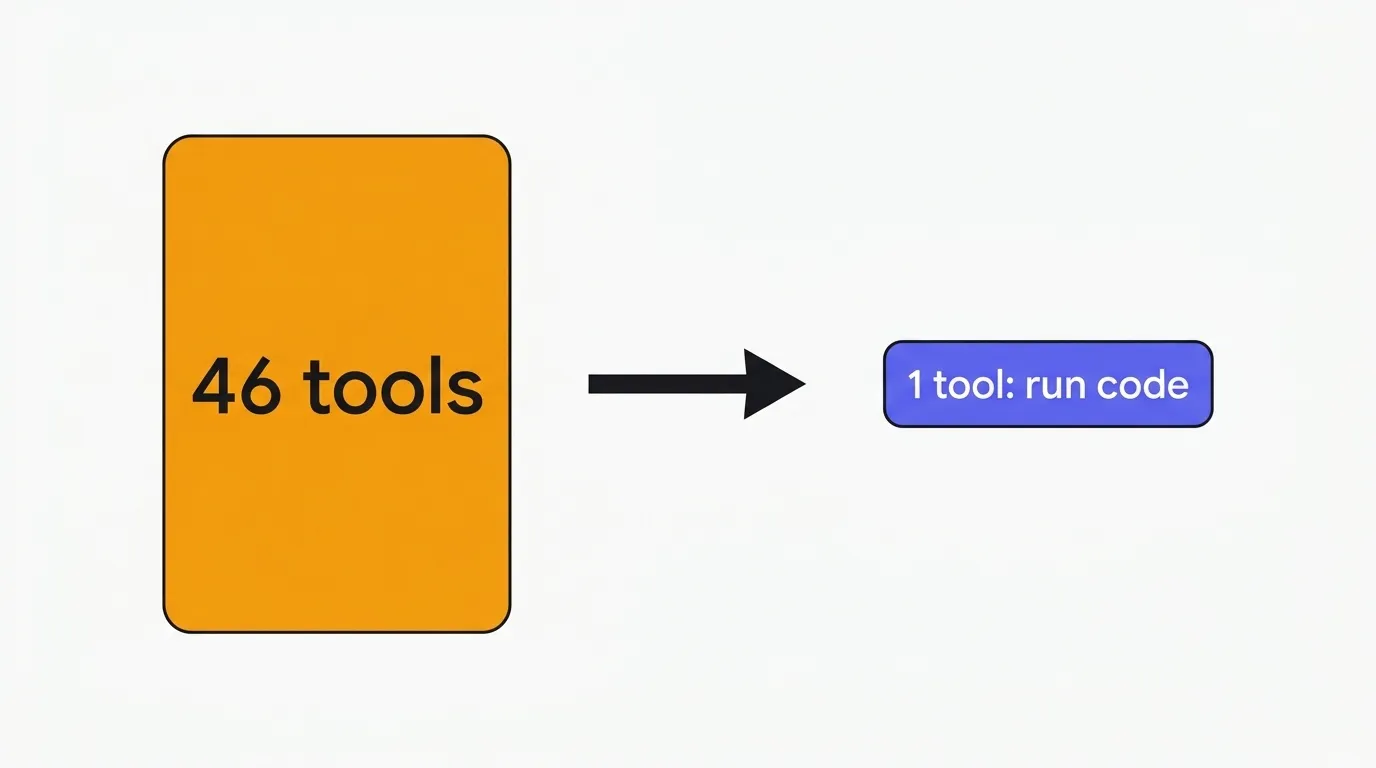
While digging, we came across Anthropic’s Code execution with MCP: Building more efficient agents. The argument: tool declarations and tool results eat an enormous share of the context, when the same work could be a few lines of code the agent writes itself. I won’t retell the article. I’ll tell you how we implemented it.
We opened up our agent and counted more than 46 tools. Our stack runs on LangChain, so we went to read the traces in LangSmith. The hunch held: tool calls were taking the lion’s share of the tokens.
There were two reasons.
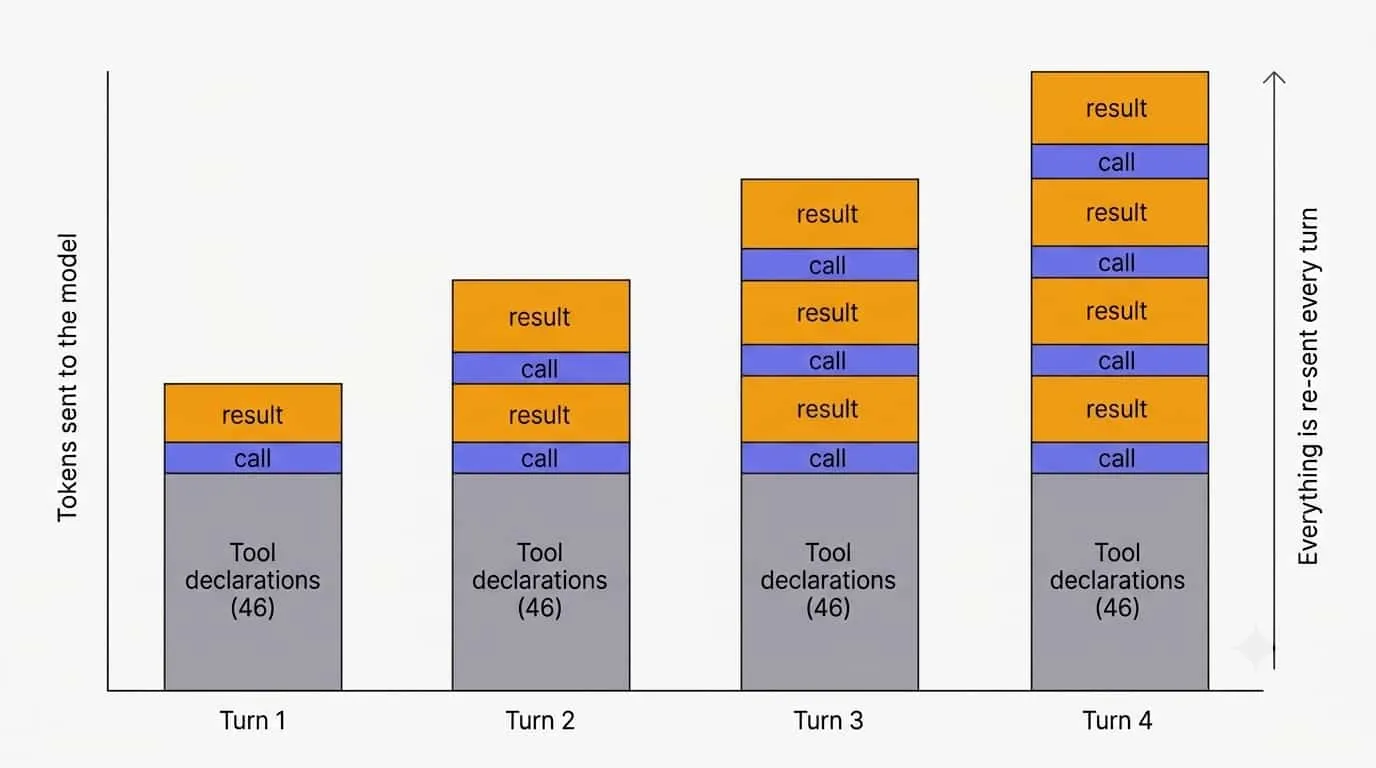
- Every operation is its own tool. Read, create, update — each one gets a declaration. And every call to the model drags along all of those declarations, plus the input and output of every call before it.
- Every tool needs instructions. When to call it, when not to, how not to get the arguments wrong. Dozens of tools mean dozens of those blocks in the system prompt.
Anthropic’s idea kills both problems at once. One tool instead of 46. And when the tools leave the prompt, their instructions leave with them.
It sounds suspicious. Won’t running generated code be slow, expensive, and full of errors? We asked the same questions. The trouble was real, and I’ll get to it at the end. But what it cost us to solve is nothing next to what the client was paying for tokens.
Example one: updating a document
An agent almost never gets away with a single tool call. Usually it’s a chain: find the entity, fetch it, update it, check the result. Each step is its own tool call. And every following call to the model drags along the input and output of all the previous ones, as if we were making them again.
Say the agent needs to update a document:
// The model fetches the current document to confirm it exists
// and to see its current state
TOOL CALL: get_document(123)
  -> "This document contains a huge amount of information...\n[full document]"

// The model updates the document, passing the new data along with the old
TOOL CALL: update_document(123, { ...full document, new information })
  -> "This document contains a huge amount of information...\n[full document]"
One simple operation, and the entire document ended up in the context. Three times over: in the read result, in the update arguments, in the update result. A thousand lines in the document turn into three thousand lines you pay for.
The same thing with code generation:
import { getDocument, updateDocument } from './api.js'

const current = await getDocument(123)

await updateDocument(123, {
  title: current.title,
  data: `Updated info`, // the AI fills in whatever needs to be passed
})

console.log(`Document ${current.id} updated`)
Only the code and one line of output reach the context. The document itself never does — the runtime reads it and passes it along. The model handles one logical operation instead of shuttling data back and forth.
And the main thing: instead of a chain of tool calls, there is one.
Example two: reading and aggregating
Here’s a more interesting case. A user wants the average price of a product across the listings that are currently in stock.
The usual approach:
TOOL CALL: get_products(name: 'iPhone 17 Pro Max')

OUTPUT (all of it lands in the model's context):
id: 1
title: iPhone 17 Pro Max 256GB
price: 1399
description: The description contains a huge amount of information...
status: available
seller: Northline Electronics
rating: 4.7
reviews_count: 812
warranty: 12 months
shipping: free, 2–4 days
condition: new

id: 2
title: iPhone 17 Pro Max 256GB
price: 1199
description: The description contains a huge amount of information...
status: out_of_stock
seller: Halberd Mobile
rating: 4.2
reviews_count: 154
warranty: 6 months
shipping: $12, 5–9 days
condition: refurbished

... and so on for every listing
To get one number, the model loaded every product in full, including fields the task never touches. On top of that, we handed it the filtering and the arithmetic. And AI still hallucinates and still trips over simple math. What happens when there are several hundred products? The answer will probably be wrong.
Someone will say: add filters and field selection to get_products. That doesn’t fix the problem, it feeds it. More parameters in the declaration, more instructions in the prompt.
Now in code:
import { getProducts } from './api.js'

const products = await getProducts({ name: 'iPhone 17 Pro Max' })
const inStock = products.filter((p) => p.status === 'available')
const avg = inStock.reduce((sum, p) => sum + p.price, 0) / inStock.length

console.log(`Average price: ${avg.toFixed(2)}`)
Five lines instead of thousands of lines of text in the context. One line goes back to the model: the result.
Saving tokens isn’t even the best part. The better part is that strict computation moved into the runtime, where 1399 + 1199 always gives the same answer.
These examples are simplified to make the idea visible. In a real app the gap is much wider.
How it works under the hood
Stack: Node.js, Fastify, Postgres, Redis. On the AI side, LangChain and the deepagents library on top of it, which brings ready-made abstractions for agents, subagents, and their backends.
Which raises a question. The model doesn’t execute code, it generates text. Running that text on our own server is out of the question — the AI will write anything. We need an isolated sandbox that lives exactly as long as the agent call.
We went with modal.com: containers spin up through an API. We need very little from the service — write a file, run a command. Hundreds of runs cost tens of times less than the tokens we no longer pay for.
A container for the session
Every agent run gets its own container. Besides a runtime, it needs the files the agent will use to reach our data:
const sandbox = await Sandbox.create({
  image: 'bun', // the runtime that will execute the generated code
  files: {
    'api/document.ts': '...',   // a thin client for our backend
    'types/document.ts': '...', // the shapes it returns
    // ...one file per domain
  },
})
Five tools instead of forty-six
There is nothing exotic here from the AI’s side. The agent gets a handful of tools and works with the container through them:
ls(path)               — see what's in a directory
read_file(path)        — read a file
write_file(path, text) — write a file
edit_file(path, ...)   — edit a file
execute(command)       — run a command in the container
The count isn’t even the point. The point is that the set stops growing. However many new entities the app gains, there will still be five tools.
The backend subagent
We hid the sandbox behind a separate subagent — our architecture already had agent orchestration. The main agent doesn’t write code. It states the task in plain language and hands it down.
// This subagent's backend is the sandbox: ls, read_file, write_file and execute
// come from the runtime, so we never declare them
const backend = createAgent({
  backend: sandbox,
  systemPrompt: SANDBOX_MAP, // the map of the sandbox, see below
})

const main = createAgent({
  systemPrompt: MAIN_PROMPT,
  subagents: [
    {
      name: 'backend',
      // This is everything the main agent knows about the sandbox
      description: `Executor. Reads, creates, updates and deletes data.
        Give it concrete mechanical instructions and every id it needs.
        Never hand it judgment: search by meaning, comparison,
        deduplication and ranking stay on the calling side.`,
      agent: backend,
    },
  ],
  tools: [writeToChat, proposeDecision], // all that's left of 46 tools
})
Two things matter here.
First: the main agent kept its voice, the way it answers the user, and one action where the choice belongs to the model rather than the runtime. All the data moved down.
Second: that description replaced 46 declarations. It is the new interface to the data, and it is where we drew the line between roles — the subagent does mechanical work on a fast model, the main agent thinks. Getting that boundary right mattered more than describing any individual tool.
What’s inside the container
An empty container is useless: no API of ours, no idea what data it works with. At startup we drop in a thin client for the backend and the type declarations:
// api/document.ts — what the AI imports
export function fetchDocuments(folderId): Promise<Document[]>
export function updateDocument(folderId, id, input: UpdateDocumentInput): Promise<Document>

// types/document.ts — what it reads when it needs details
export type Document = {
  id: string
  title: string
  status: 'draft' | 'in_review' | 'published' // exactly three values, no 'archived'
  authorId: string | null                     // can be null, and that matters
  publishedAt: string | null
}

// Not everything is writable
export type UpdateDocumentInput = Partial<Pick<Document, 'title' | 'status' | 'authorId'>>
The types aren’t a formality. They are the main source of the savings. One declaration, and the agent knows the exact field names, what can be null, which values are allowed. Without it, it would pull the whole document list just to see how a document is shaped. The subagent’s prompt turns this into a rule: read the type first, then write the code.
A map of the sandbox
An agent that doesn’t understand its container will wander around it with ls and read_file, hunting for the right function. Reconnaissance costs more tokens than the task.
So we put a map in the subagent’s system prompt:
/home/sandbox/
├── api/    ← functions that call our backend
└── types/  ← the shapes those functions return

api/document.ts
  fetchDocuments(folderId)               // every document in a folder
  updateDocument(folderId, id, input)    // update a document
api/folder.ts
  fetchFolder(folderId)
  fetchFolderMembers(folderId)
api/search.ts
  searchEverything(query)                // search every entity at once, by meaning
...
The map sets the direction. The agent uncovers the details as it goes: reads the files it needs, checks the declarations. But it reads only what it decides it needs.
Problems we ran into
Cold container starts
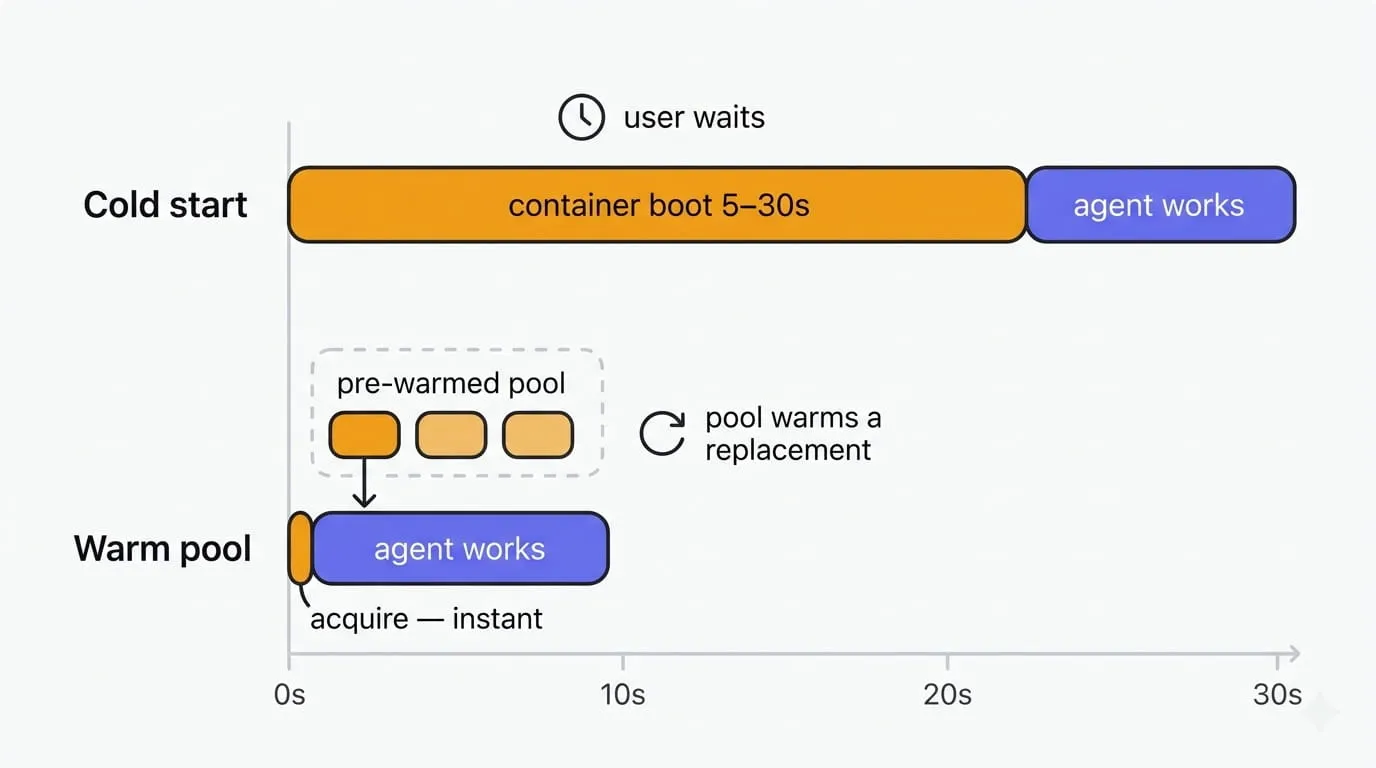
A container takes between 5 and 30 seconds to come up. The agent no longer starts without one, so that wait was tacked onto every reply the user got.
The fix was a pool of hot containers:
// Already up, files already in place — handed over instantly
const sandbox = await pool.acquire()

try {
  await runAgent(sandbox)
} finally {
  await sandbox.close() // the pool starts warming a replacement right away
}
The pool keeps itself warm, both after handing a container out and after getting one back. It only warms up while there are live users in the app. Once everyone leaves, it releases everything it was holding.
We paid for this with a slightly larger container bill. Next to the model bill, it doesn’t register.
The AI can write any code at all
The AI writes the code itself, which means we aren’t protected from bad code or from malicious code. Or from a user who decides to take advantage of that. Ask for a billion documents and the agent will dutifully write a loop that creates a billion documents.
The defense is layered:
- Code runs in an isolated container, not on our server.
- The container reaches the backend only with its own token: one workspace, one user.
- The container has a lifetime window, past which it stops existing.
- The subagent’s prompt sets bounds on a reasonable volume of operations, plus rules for efficient code.
Where we landed
Costs dropped by a factor of 15. The more interesting part is that the agent got more capable.
It used to do exactly what we declared: 46 tools, 46 abilities. Now the list isn’t the limit. The agent writes whatever code solves the task best, including code we never thought of at design time.
To get something done in the app, the AI writes a few lines and gets back exactly what it needs. The drudgery is gone: mechanical data wrangling, trips to the database, shuffling fields back and forth.
What’s left is the thing AI was built for. Intelligence.